


Monster Job Search
4.315.99K Reviews
App Specs
- Version
- 20.1.16
- Updated On
- License
- Free
- Downloads
- 5,000,000+
- Developer
- Monster Worldwide
- Categories
- Business
- Platform
- Android, iOS
Screenshots


 Analysis by AppCompare
I use Monster Job Search as a place to organize a job hunt on my phone, especially when I want to check openings in short stretches of spare time. It is a business app from Monster Worldwide, and its focus is straightforward: search for work, keep promising roles in view, and move from browsing toward an application. That makes it useful as a practical companion, though I would treat it as one part of a job-search routine rather than the whole routine.
What the app is suited to right now
The app is free, rated for Everyone, and has an average rating of 4.3 from around 80,000 ratings, with roughly 16,000 written reviews. More than 5 million installs suggest it has reached a broad audience, but those figures do not tell me whether a particular role or location will have a strong selection. The useful question is whether its search and application flow fit the kind of work you want and the way you prefer to look for it.
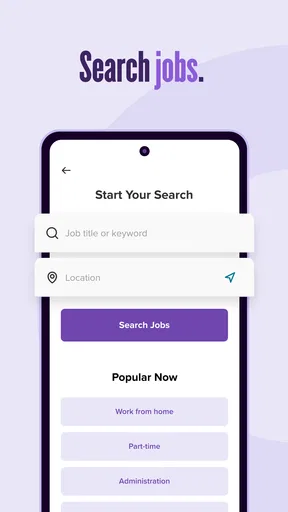
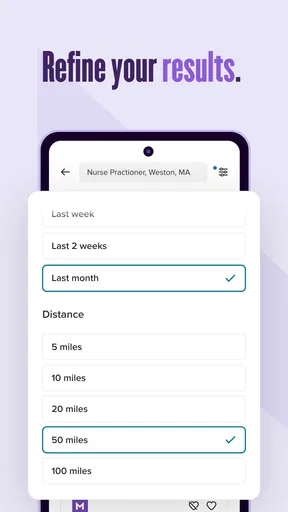
For someone checking opportunities across several locations or job types, the ability to narrow a search is more valuable than simply scrolling through a large feed. I would start with a clear job title and location, then adjust one filter at a time. That makes it easier to see whether a search is too narrow or whether a broader set of results is worth reviewing. If you are unsure of your next move, searching more than one related title can also expose roles that use different wording for similar responsibilities.
A calmer way to manage a search
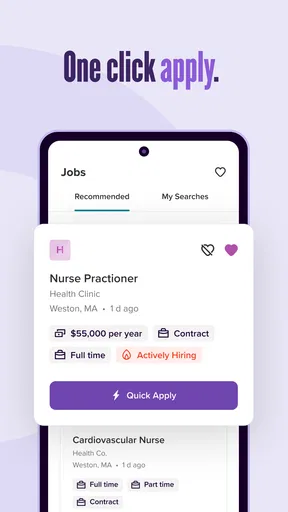
Job hunting can become chaotic when you find roles in different places and try to remember which ones deserve a closer look. Saved jobs give me a simple holding area: I can collect possibilities during a quick browse, then return later to compare them with a clearer head. I would use that space as a shortlist, not as a substitute for a separate record of applications, deadlines, and follow-ups. A saved listing and an application are different stages, and keeping that distinction clear prevents a promising role from slipping through the cracks.
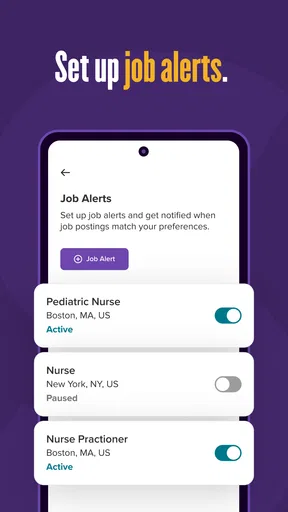
Alerts are helpful when I already know what I am looking for, but I would avoid creating too many broad ones. A stream of loosely related notifications can become background noise, making it easier to ignore the one opening that actually fits. I prefer to begin with a small number of specific searches, check whether their results are relevant, and then refine them. This gives alerts a job to do instead of turning them into another inbox to clear.
The User Experience
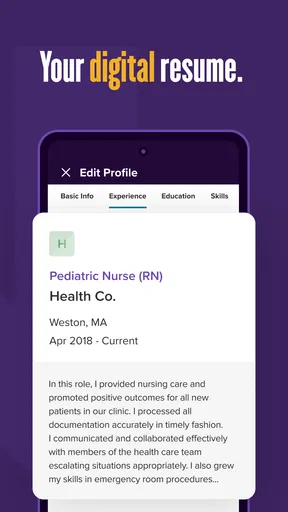
First things first, let’s talk about the user interface. The Monster Job Search app keeps things pretty straightforward. You open it up, and there’s no fuss – it’s all about getting you to the jobs you want. The layout is clean, with a simple navigation bar at the bottom. It’s got tabs for job searches, saved jobs, and even a section for your profile where you can upload your resume and keep it polished.
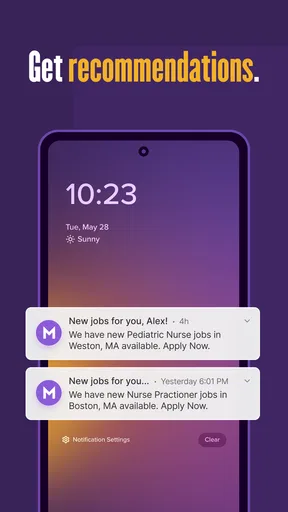
What I love here is the search functionality. You can filter jobs based on location, industry, and even job type, which saves a ton of time. Plus, there’s the option to set up alerts, so you don’t miss out on any new listings. Seriously, who doesn’t love a good notification?
Worth Reading Before You Choose

EA SPORTS FC Mobile 26 Is a Bigger Football Game, but It Takes Time

Flipboard Shows What News Apps Must Do Beyond the Feed

Switching to Android Auto Means Rethinking Your Driving Routine

Google Calendar Makes a Crowded Week Easier to Manage

Ludo King Makes the Most of the Minutes Between Plans

Baby Panda World Brings Quick Play to Modern Phones, but Its Game Library Feels Busy
Features That Stand Out
One of the standout features of the app is its ability to recommend jobs based on your profile. It’s like having a little career coach in your pocket. The more you interact with it, the better the recommendations get. It learns from your saved jobs and applications to fine-tune what it shows you. It’s pretty neat.
Another feature worth mentioning is the in-app chat functionality. You can connect with potential employers directly through the app, which is a game-changer. It makes the whole process feel more personal and less like you’re tossing your resume into the void.
And let’s not forget the resume upload feature. You can easily upload your resume and even get tips on how to improve it. The app gives you suggestions on keywords and formatting, which is super helpful if you’re looking to stand out.
Using it alongside other job-search tools
I would not rely on a single job board when the search matters. Monster is most useful for discovering and tracking openings in one place; a company’s own careers page can be better for confirming that a role is still open and reading the employer’s full details. Professional networks can be more useful when your search depends on contacts, referrals, or industry conversations. The trade-off is that spreading the search across several services takes more effort, so I use Monster to build a shortlist and verify important details before applying.
Here is a realistic way I would use it during a busy week: on a commute or a lunch break, I search for a particular role near a preferred location and save a few plausible listings. Later, at a desk, I compare their requirements with my resume, tailor the document for the strongest match, and apply. I would then note the employer, role, and application date somewhere I already use for tracking. That small handoff matters: quick mobile browsing is convenient, but careful application work is easier when I can review the job and my materials without rushing.
Small choices that improve the workflow
For better recommendations, I would keep the profile and resume aligned with the work I actually want, rather than loading them with every skill I have ever used. A focused profile gives the app a clearer signal and makes it easier for me to judge whether suggested roles are relevant. I would also save jobs selectively. If everything goes into the saved list, it stops functioning as a useful shortlist and becomes another backlog.
Before using any job app to apply, I make a quick check that the resume version I intend to send is current and that its contact details are correct. If I am changing career direction, I keep a version that foregrounds transferable experience instead of assuming one general resume will suit every role. The app can help surface opportunities and offer resume guidance, but I still make the final decisions about what to emphasize and whether a listing is a good fit.
Performance and Usability
Now, you might be wondering how it performs. I’ve used the app on both Android and iOS, and it runs smoothly on both. There’s no lag or crashes, which is crucial when you’re in the middle of applying for jobs. The app updates listings frequently, so you’re always looking at the freshest opportunities.
One thing to note, though, is that you’ll need a stable internet connection to make the most of it. While offline access to saved jobs would be a cool feature, it’s not a deal-breaker.
Where I would be cautious
The convenience of a fast application flow should not push me into sending the same materials everywhere. A role can look suitable in a short listing but require qualifications, location details, or working arrangements that change the decision once I read more carefully. I would open the full posting before applying and check that the responsibilities match what I want, not just the title. If an employer’s instructions require a different application route, I would follow those instructions rather than assume the in-app route is always the best one.
Chat can make contact feel more direct, but I would still keep messages professional and specific. A short note referring to the role is more useful than a generic introduction, and I would not treat a chat option as a promise of a quick response. For roles where the hiring process depends on formal documents, a detailed application, or a referral, the app is a starting point; it cannot replace the preparation and follow-through those situations need.
Who should choose it, and who may prefer another route
I think it suits active job seekers who want to search from a phone, keep interesting openings in one place, and get a nudge when relevant listings appear. It can also help someone returning to the market who wants a manageable way to explore titles and locations before settling on a plan. The profile-based suggestions are most useful when the information in the profile reflects a clear direction; people still deciding between unrelated fields may find a broader, manual search more informative at first.
If you are looking for highly specialized roles, relying on one general job app may leave gaps. I would pair it with industry-specific boards or direct employer searches when the field has its own hiring channels. Likewise, someone who prefers to network first may get more value from professional communities and personal contacts, then use Monster to find and track openings. The right choice depends less on which service has the biggest-looking feed and more on where the employers you care about actually post.
Monster Job Search is currently at version 20.1.11, and its release history begins on March 17, 2015. Those details tell me the app has had a long life and continues to have a current version, but they do not by themselves establish which individual changes were introduced along the way. For someone already using it, I would judge the present experience by whether searches, saved listings, profile details, and applications still support their routine. I would also check after an update that my profile and saved work remain as expected before relying on the app for an urgent application.
What I would keep an eye on
As the product continues to evolve, the changes that would matter most to me are practical ones: whether search results stay relevant, whether the application steps remain clear, and whether communication with employers feels dependable. Those are the points that affect a real job hunt more than a longer feature list. I would also want job recommendations to remain easy to evaluate, so I can understand why a role is appearing and decide whether it deserves my time.
If you are deciding whether to install it, I would start with one focused search and a realistic profile rather than trying to configure every possibility at once. Save only roles you would genuinely consider, then see whether the results and alerts earn a regular place in your routine. That short trial gives you a practical answer about relevance without letting an app dictate your job-search strategy.
Final Thoughts
All in all, the Monster Job Search app is a solid choice for anyone looking to streamline their job hunt. It’s intuitive, packed with useful features, and definitely worth a download if you’re serious about landing that dream gig. Whether you’re a recent grad or someone looking to make a career switch, it’s got something for everyone.
So, if you’re ready to take the plunge and explore new career horizons, this app might just be the trusty sidekick you need. Happy job hunting!
Pros
- Intuitive interface for easy navigation.
- Extensive job listings across industries.
- Customizable job alerts.
- Integrated resume builder.
- Comprehensive company reviews.
Cons
- Limited international job listings.
- Occasional app crashes reported.
- Some features require premium access.
- Ads can be intrusive at times.
- Profile setup can be time-consuming.
FAQs for Monster Job Search
What features does Monster Job Search offer to job seekers?
Monster Job Search provides a range of features including personalized job recommendations, resume upload and editing, job application tracking, and notifications for new job postings. Users can also customize their profiles to highlight skills and experiences, making it easier to connect with potential employers.
Is Monster Job Search available for both Android and iOS devices?
Yes, Monster Job Search is available for both Android and iOS platforms. Users can download the app from the Google Play Store for Android devices and the Apple App Store for iOS devices. The app is designed to provide a seamless experience across both platforms.
How does the Monster Job Search app ensure user privacy and data security?
Monster Job Search uses advanced encryption methods to protect user data. The app adheres to strict privacy policies and complies with international data protection regulations. Users have control over their privacy settings and can choose what information to share with potential employers.
Can I apply for jobs directly through the Monster Job Search app?
Yes, you can apply directly for jobs through the app. Once you find a job listing of interest, you can submit your application with a few taps. You can also attach your resume and cover letter, which can be stored and managed within the app for convenience.
Are there any costs associated with using Monster Job Search?
The Monster Job Search app is free to download and use for job seekers. However, there may be premium features or services that require a subscription or one-time payment. These features are optional and designed to enhance the job search experience, such as advanced analytics or personalized career coaching.


